SURF Application Questions
No, we expect that each application has a student attached to it. Since the students are the ones receiving funds, it is important to for us to see their portion of the application.
We are able to fully fund up to three students per mentor. You can apply with more than three students, but the total award amount would be split among those students. For example, if the full award amount is $1500, we would be able to fund your group $4500 and that amount would be divided among the number of students who you apply with. You can decide how the funds are divided among the students; our default will be to split the amount equally. PLEASE NOTE: Each student needs their own application.
If we have funding to award S&E requests, we are able to fund consumable items and computer program licensing for the student. The S&E request should include an itemized list with a cost break down. If a detailed itemized list is not included, we will not be able to fund the request. We are not able to fund printing, catering, honorariums, travel (see our travel award application), or gift cards for study participation.
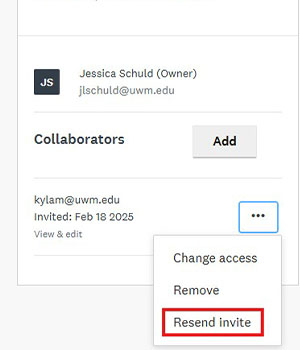
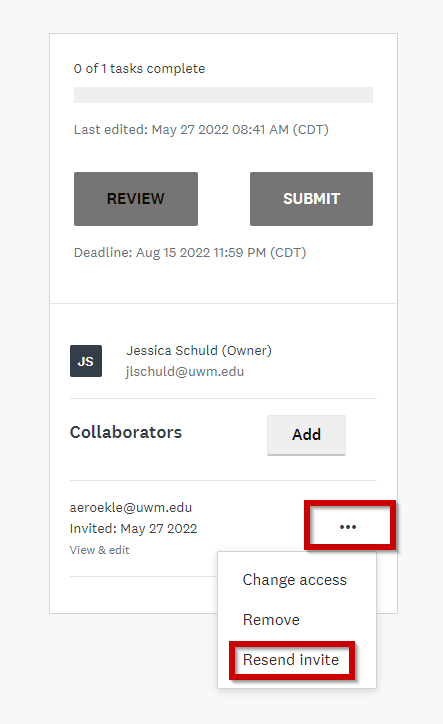
First, make sure you have entered their email address correctly. If the email address is correct, you may need to resend an invite to the student. If this does not resolve the issue, you can try removing the student from the collaborator section and re-adding them. If you experience issues after following these steps, contact Jessica Schuld (jlschuld@uwm.edu) for assistance.
In some cases, it is because you have not “Marked as Complete” the eligibility section of the application. They can not see their application until you finish that section of the application.
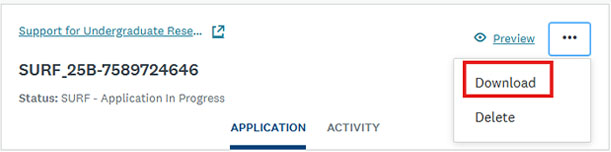
Each funding cycle, we need to archive the previous applications. You can request a copy by contacting Jessica Schuld (jlschuld@uwm.edu). In the future, once you have submitted your application you are able to download a PDF from your application dashboard.
SURF Award Management
You will need to log into Workday where you will see hours that need approving under “Tasks”. If you need additional assistance, please contact sscstudenthr@uwm.edu.
The terms and conditions of the SURF award allow you to terminate the award for any reason you see fit. Depending on the situation, we may be able to transfer the funds, please contact Kyla Esguerra (kylam@uwm.edu) to inquire about a transfer.