Projects conducted by UWM faculty, staff and/or students require UWM IRB approval if they meet the regulatory definitions of (a) “research” AND (b) “human subjects”.
- Does your project meet the definition of “Research”?
Are you planning or conducting a project with the goal of generating scientifically valid results, which will be shared with other professionals in your field? - Does your project involve “Human Subjects”?
Are you interacting with or observing people, in person or online, and collecting data about those people? OR are you obtaining or accessing identifiable, private information about people or identifiable biospecimens?
If you answer YES to the above questions, IRB review and approval is required before you may begin your study.
If you’re not sure, or if it doesn’t meet these definitions but you need formal notification from the UWM IRB, complete a Determination form through I-Manager. Visit the Submitting a Determination Form Guide (PDF) for instructions.
Turnaround time depends on workflow and the number of submissions received; please check our main webpage for a current estimate of review time.
Steps to Submitting a Study for Review
Visit the “IRB Application Form” section of the Forms page for more information about I-Manager submissions.
Visit the “Synchronous Training Sessions” section of the Training page to register for an in-person training session.
- Determine if your study involves Human Subjects Research and if UWM is engaged. If you know that your study involves Human Subjects Research, then move to step 2. If you aren’t sure, please review the “Do I need to Submit to the IRB” section for more guidance.
**Note: If you’re working with a researcher from another institution, or conducting research at another institution, please contact the IRB office before preparing any paperwork (visit the Deferral Requests section of the Forms page and our guidance document on working with multiple IRBs (PDF)). - Complete Human Subjects Protection Training (CITI). All PIs and Student PIs are required to complete CITI training. If you completed training at another institution, please include a copy of your completion certificate when you submit your study.
- Understand the IRB’s Guidelines and Procedures (DOC).
- Studies being reviewed under Exempt and Expedited status may be submitted at any time. Typical turnaround times:
- Exempt submissions are reviewed by IRB office staff. You will receive either an approval letter or request for revisions within approximately 2-3 weeks, although this may take longer during our busiest times (usually Mar-Apr and Oct-Nov). Allow a minimum of 3-4 weeks total.
- Expedited submissions are sent to one or more IRB members for review. You will receive either an approval letter or request for revisions within approximately 4 weeks, although this may take longer during our busiest times (Mar-Apr and Oct-Nov). Allow a minimum of 5-6 weeks total.
- Full Board submissions are reviewed at the monthly IRB meeting. Visit the Meeting Dates page for submission deadlines.
- All IRB submissions must be submitted through I-Manager. To create an account, log in with your PantherID. An account will automatically be created.
- If your study involves other sites (e.g., recruiting from Milwaukee Public Schools, accessing medical records from Froedtert, using imaging equipment from Aurora, etc.), make sure you are aware of any additional IRB’s or institutional policies beyond that of UWM’s IRB. Refer to note under Step 1 above.
- Plan ahead! There are multiple steps to the IRB process. The basic steps are outlined below:
- Start an IRB Application Form in I-Manager. There is also a Downloadable Version (PDF) of the form.
- All application questions are listed in the PDF. However, there is programming within the form, so many questions will appear only if you answer earlier questions a certain way when you’re completing the form in I-Manager.
- Answer the questions within the IRB Application xForm.
- Attach all supporting documents to the xForm (e.g. Consent Form(s), data collection instruments, questionnaires, advertisements, recruitment scripts, etc.).
- Rule of thumb: If a participant will see or hear it, submit it.
- Only UWM faculty or staff may serve as the Principal Investigator (PI) on the study. If a student, research assistant, etc., submits a study in I-Manager, the study will first be routed to the PI. The PI must log in, review the submission, and electronically sign the form. Then the study will go to the IRB office for review.
- The IRB office will review your submission for completeness and determine the review category. The office will either: (a) request revisions, or (b) send the study to an IRB member for review. Check the IRB homepage for current estimated turnaround times for IRB office reviews.
- Submissions requiring Full Board review will be placed on the next scheduled meeting based on submission deadlines.
- Exempt and Expedited studies are not reviewed by the Full Board; IRB staff and members review these as they are submitted.
- The IRB office will notify you of revisions/clarifications requested by the reviewers.
- Once the requested revisions have been satisfactorily addressed, you will receive an approval letter via email. You cannot begin your research (including recruitment, scheduling interviews, etc.) until you receive the approval letter.
- Start an IRB Application Form in I-Manager. There is also a Downloadable Version (PDF) of the form.
- If your study currently has IRB approval, keep track of the expiration date. You will receive automated reminders as your expiration date approaches. These reminders will include instructions for keeping your study open or closing it. If a continuing review is required, submit a continuing review no later than three weeks before the expiration date. Your study must be reviewed by the IRB before the expiration date, so this allows adequate time for continuing review submission, review, and approval.
Post Approval Review Guidance
To provide a more thorough review of currently approved studies, the UWM IRB has developed a post approval review process. The purpose of the review is to enhance the protection of human subjects and the oversight of approved research. The reviews will be completed to verify that IRB approved procedures are being followed. In addition, the IRB will use the results to develop researcher education and improve IRB processes/procedures/guidance.
Any active full board or expedited study involving human subjects may be selected for review. A PI will have no more than 1 study reviewed per fiscal year. Studies may be selected for review for any of the following reasons:
- By request from a PI, SPI and/or coordinator
- Studies that involve more than minimal risk
- Studies involving medical devices, vulnerable populations, sensitive data
- Studies that are Federally funded
- Studies that were found to have non-compliance, a reportable event and/or deviation
- Randomly selected studies
General Procedures for Post Approval Reviews
- The IRB office will identify a study for review based on the reasons listed above.
- The IRB office will determine who will review the study – IRB member(s) and/or IRB staff. A post approval review event will be created in the study’s I-Manager page.
- The IRB office will contact the PI via email to schedule the review. The email will include:
- A description of what a post approval review is
- The reason why and/or how the study was selected
- How the post approval review will be conducted and by whom
- An attachment of the Post approval review checklist (PDF), so the PI understands what is being reviewed. This is the checklist the reviewers will use to guide their review.
- A list of items that will be discussed and/or reviewed:
- Current study procedures and activities
- Informed consent process and a review of signed consent forms (if applicable)
- Visit of data collection site (if possible) to view equipment, devices, etc.
- Review of subject data/records (paper and electronic)
- Training records of staff (if applicable)
- A request to select a date/time/location to meet (within 30 days of the request, when possible)
- A request to provide the current number of subjects enrolled
- On the selected meeting day, the PI will be requested to provide access to study records (including, but not limited to, signed consent forms, study records/data, training records of study staff, access to equipment, etc.) and be available to answer reviewer questions.
- The IRB will use a Post approval review checklist (PDF) to review study documents and procedures. Throughout the meeting and with a summary at the end of the meeting, the reviewer(s) will verbally review positive observations, items that may require follow-up, and recommendations (that are optional) with PI, SPI, coordinator, etc.
- The IRB will write up a summary report of observations and any corrective actions. The report will be sent to PI and filed with IRB study records. If corrective actions are required, the PI will need to provide a corrective action plan within 4 weeks to specify how issues will be resolved. The plan will specify how an item will be resolved and a target date for completion (but not necessarily completed yet).
- After all corrective actions have been completed, the post approval review will be considered completed/closed. All review documents, emails, notes, etc. will be saved in the study’s I-Manager file.
- Post approval review results will be reported to the IRB and the IO at IRB meetings.
- # of reviews conducted
- # of positive findings
- # of corrective actions
- # of recommendations
- # of corrective actions, improvements, new guidance, etc. for the IRB
If you wish to make changes to a previously approved research project, please submit an amendment via I-Manager.
The process for submitting an amendment differs based on whether your study has a “Reference xForm.” All studies that were approved with the IRB Application Form (launched in August 2021) will have a Reference xForm.
If you’re not sure that the study has a Reference xForm, you can find out by clicking on “Start xForm” in the upper left corner on the approved study’s homepage. If there is NOT an option for “IRB Amendment Form,” it means your study has a Reference xForm.
Submit an Amendment for a Study with a Reference xForm
- Go to the study’s homepage in I-Manager.
- Under the “Reference xForms” tab, “Actions” column, click on the icon next to the IRB Application Form. The icon is two pages with a green plus sign. Clicking this icon will start the amendment.
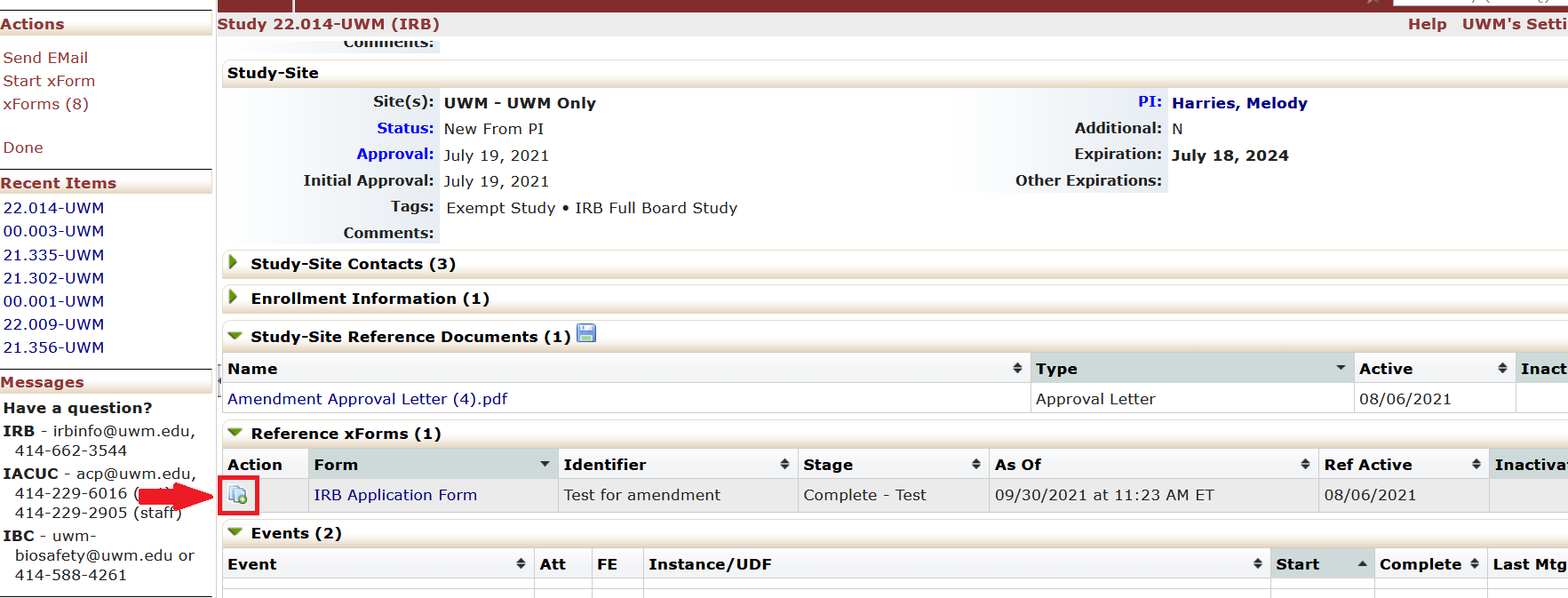
- The IRB Application Form will appear with the amendment questions embedded in the form. Answer the new questions about the amendment.
- Your existing study information will be pre-populated in the form. Go through each page and update any information that has changed. The IRB office staff and reviewers will be able to see the changes that you made.
- Additional questions or pages may appear based on your responses to the amendment questions, so it’s important to go through the form in order rather than jumping around. However, if needed, you can navigate to other pages with the dropdown menu at the top of the page.
- Upload any revised or new documents in the appropriate sections, with the changes marked. We prefer that you use tracked changes for revisions, as this is easiest for us to see exactly what is different from the original version.
- Submit the form by signing with your username and password.
- If you are not the PI, the study PI will receive a link to the form. The PI will also need to electronically sign/submit the form.
- Once the PI submits the form, it will be routed to the IRB for review.
Submit an Amendment for a Study without a Reference xForm or Submit a Continuing Review
- Log into I-Manager.
- Scroll to the “My Studies” section near the bottom of the page, and click on the study number.
- From the study home page, click “Start xForm” in the left side menu.
- Select “Amendment xForm” or “Continuing Review xForm”.
- Complete the xForm and attach the required documents.
- Amendments: Use track changes, highlight, or otherwise clearly mark your changes in all relevant study documents (protocol form, consent forms, recruitment materials, etc.). Attach these revised documents to the amendment xForm.
- Continuing Reviews: Attach the current approved versions of your protocol, consent form(s) and all recruitment materials.
- Enter your password to submit the form.
- If you are not the PI, the study PI will receive a link to the form. The PI will also need to electronically sign/submit the form.
- Once the PI submits the form, it will be routed to the IRB for review.
There is also a video demonstration available.
The steps for submitting a Continuing Review are the same for all studies.
Turnaround Time
All types of submissions (new studies, amendments, continuing reviews, etc.) are reviewed in the order in which they are received. Visit the IRB home page for current estimated initial office review times.
- Amendments: The majority of amendments are reviewed by IRB office staff only. For major changes, your amendment may be sent to an IRB member for review, which adds another 1-2 weeks to the review time.
- Continuing Reviews: You’ll receive an automated notice when your continuing review is accepted for review. If you don’t hear anything from us after the automated notice, this means we had no questions or concerns and you will receive your new approval letter on or just before the expiration date.