Employee Questions
- Turning age 65 does not affect your benefits. There is no reduction in your health premium nor is this a qualifying event to add or cancel benefits.
- You are not required to enroll in Medicare, Part A or B if you and/or your spouse are covered under a group policy through active employment.
- Please reach out to the benefits contact listed on the Client Group Assignments web page.
- Health or Dental: Contact the appropriate provider as given in the It’s Your Choice Decision Guide which can be found at Wisconsin Department of Employee Trust Funds.
- VSP Vision: No card is issued. Identify yourself as a University of Wisconsin employee and provide your employee ID number (8 digit number beginning with 2 or 3 zeros, found at the top center of your earnings statement).
- Navitus (pharmacy)
- Phone: (866) 333-2757
- Online: https://www.navitus.com
- Phone: (877) 533-5020
- Online: https://etf.wi.gov
Please see the Employee Assistance Program web page for contact information.
- You would not want to enroll in Medicare Part B until right before you retire. Consult your Benefits Specialist at that time. There is a monthly fee for Medicare Part B, and it would be considered secondary coverage to your employee health plan.
- If you are in a regular health plan, you may wish to enroll in Medicare Part A. Medicare Part A is at no cost, and though considered secondary coverage to your employee health plan, it may add coverage in instances of hospitalization or rehabilitation.
- If you wish to remain enrolled in a High Deductible Health Plan, no. If you enroll in Medicare Part A, you will no longer be eligible to participate in the high deductible plan–the state will require you to attest that you have not enrolled, or it will switch you to your High Deductible Health Plan’s regular counterpart.
- Universities of Wisconsin: How To Enroll
- Universities of Wisconsin: Employee Benefits Packages
Universities of Wisconsin: How to Enroll
Graduate Student Questions
You will know that you are benefit eligible as a Graduate Assistant/Short Term Academic Staff if you are in one of the following employment categories:
Student Assistant
You must be in one of the following titles: Research assistant, Fellow, Advanced Opportunity Fellow, Scholar, Trainee, Teaching Assistant, project Assistant or Program Assistant and be expected to work at least 33% of the time:
*For at least six months if you are a 12-month employee or at least one semester if you are a 9-month employee
Employees in Training
You must be in one of the following titles: Grad intern/Trainee, Postdoc Fellow, Postdoc Trainee, Postgrad Trainee (1-7), Intern (non-physician), Reseach Intern or Research Associate, and be expected to work at least 33% of the time:
*For at least six months if you are a 12-month employee or for at least one semester if you are a nine-month employee
Short Term Academic Staff
If not covered under the WRS, you are eligible for insurance benefits if you are expected to work:
*At least 21% for at least six months if you are 12-month employee or at least 28% for at least one semester if you area 9-month employee
You do not have to have your SSN when you initially apply for benefits as a UWM employee. And you can start the benefits process without an SSN in place.
At UWM there is an email where you can submit any questions. The email address is benefits@uwm.edu and the appropriate benefit specialist will reply to your request.
The UWM benefits website has a wealth of information regarding your benefits. You can also visit Benefits Reviews and see the latest benefit review sessions, review benefit summaries for your applicable employment category and view a video recording of a benefit presentation.
You have 30 days from your date of hire to enroll in benefits. You can typically complete this online through the My Insurance benefits site. All new employees will receive an email from the benefits team that outlines your deadline for enrolling in benefits and provides links to benefit information.
Most benefits are effective the first of the month on or following your benefits eligibility date and will remain in place for the entire calendar year.
If you do not have a My Wisconsin ID, please visit https://det.wi.gov/pages/MyWisconsin_ID.aspx to create an account.
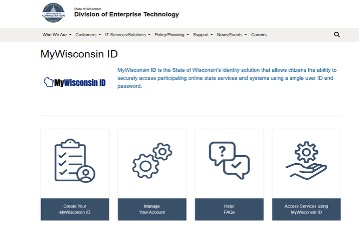
Click on the left-hand box titled “Create Your MyWisconsin ID” and follow the steps.
Log into the My Insurance Benefits Website. You can reach the website via Workday.
Once logged into Workday please select “Benefits and Pay” from the menu bar.
Click the suggested links icon and select “My Insurance Benefits” to be directed to the site.
The website will prompt you with a series of steps to complete in order to enroll. Below is a general overview of the process.
- Log in to My Insurance Benefits
- Add and/or Delete dependents
- Review coverage options & make selections
- Provide any secondary healthcare coverage info if applicable
- Finalize/confirm benefit elections
- Review summary of elections
- Complete feedback survey
- Submit verification of dependents if necessary
If you are within your 30-day window, contact your benefits specialist and we will work with you to make the enrollment correction. If you are outside of your 30-day initial enrollment window, you cannot make any changes to your benefit elections unless you have a qualifying life event or until the annual open enrollment period.
Examples of qualifying life events that would allow you to change your benefit elections outside of open enrollment are marriage, birth, adoption, loss of other coverage or moving out of state. Please see this page for a full list of qualifying life events: https://www.wisconsin.edu/ohrwd/benefits/life-events/
You will see deductions for benefit premiums on the first two checks of any given month. This equates to 24 pay periods per year.
You should review the benefits summary for grad students available here grad.pdf (wisconsin.edu). UWM offers two types of plans. The ACCESS plan is more expensive but offers nationwide coverage and the regular health plan provides local coverage for Wisconsin and limited coverage in surrounding states.
UWM offers 4 dental plans.
- Uniform dental is offered if you choose to elect a state group health plan. It covers routine evaluations, cleanings, sealants, x-rays, fillings and periodontal maintenance. Please see the benefit summary for an exhaustive list and costs run between $4 (individual plan) and $10 for (family plan)
- Preventative Dental is dental insurance that is only available if you decline state group health insurance and covers the same items as Uniform Dental
- Select Dental and Select Plus Plans are supplementary dental insurances that provide additional coverage for crowns, bridges, implants, root canals and braces. A good rule of thumb is that the higher the cost per month for the plan, the lower the deductible is and the higher the annual maximum is.
Utilize this link for a detailed breakdown of plan costs grad.pdf (wisconsin.edu)
The State Group Health insurance covers a vision exam. UWM also offers full vision insurance that’s administered by Metlife and covers routine things like glasses/contacts. Visit the following link for a detailed breakdown of vision costs. grad.pdf (wisconsin.edu)
- Individuals categorized as student assistants and short-term academic staff can enroll in the FSA (flexible spending account). Fellows, scholars, trainees, grad interns/trainees and post-doctoral fellows/trainees cannot.
- An FSA gives you the opportunity to pay certain health care, dependent day care and parking/transit expenses with tax free dollars. You are in control of how much you contribute. 1/1-12/31 is the plan year for FSA’s and some funds may be eligible to roll over. You cannot roll over dependent care funds. You must re-enroll in the FSA yearly.
- UWM offers a 403B (Supplemental Retirement program) and 457 (WI Differed Compensation program). Fellows, scholars, trainees, Grad. interns/trainees or post-doctoral fellow/trainees aren’t eligible to participate. You can enroll immediately.
- 403B-The providers that manage this are Fidelity and TIAA and a number of investment options are available including target date funds, index and guaranteed fixed rate annuity.
- 457-This account is managed by ETF through a provider called Empower. There a number of mixed investment options similar to what is listed for the 403b. Listed below are the 2025 contribution limits.
2026 Annual Plan Contribution Maximums
- Under age 50: $24,500
- Age 50-59: $32,500
Glossary
| Term | Definition |
|---|---|
| My Insurance Benefits: | The online application that employees access to enroll in or make changes in benefits which is accessed through Workday. |
| My Wisconsin ID: | An account that employees must create in order to access My Insurance Benefits. |
| Benefit election: | Your benefit elections are the options that you choose during open enrollment and that are taken out of your paycheck as pre-tax deductions. |
| Qualifying Life Event: | This is a change in your life that has an impact on your insurance coverage and typically will allow you to make changes to your benefit elections outside of your 30 day new hire window and/or open enrollment which takes place in the Fall of each year. |
| Deductible: | The amount of money that an insured person has to pay out of pocket each year for eligible healthcare services before the insurance plan begins to cover the costs. |
| Out of pocket maximum: | This is the largest amount of money that would have to pay per year for covered health services. Once you have met this amount then your insurer will pay 100% of services rendered. |
| Co-insurance: | This is the percentage of costs a patient pays for medical expenses. |
| Copay: | A set amount of money that you pay any time you receive a specific healthcare service. For example when visiting your primary doctor your office copay fee may be a set amount of $30 per visit. |
| Premium: | This is the amount billed that policy holders pay for health coverage. Premiums are paid bi-weekly at UWM. This amount must be paid regardless of whether you utilize healthcare services in a given month. |