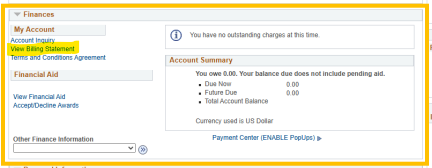
View Billing Statement: The Online Billing Statement is a real-time snapshot of your current charges and any pending financial aid. You can access it anytime by following the steps below.
- Click on “View Billing Statement.”
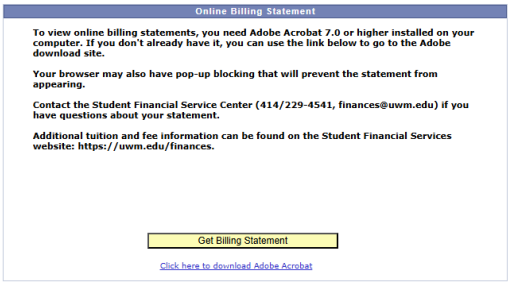
- On the next screen, click “Get Billing Statement.” Be sure to enable pop ups to view the statement.
You may see an Anticipated Balance Due or an Anticipated Credit Balance (CR) on your statement. Anticipated Credit Balance (CR) means you currently have more aid than charges. If your charges are listed in full, you can anticipate the excess will be sent to you via check or Direct Deposit, if you have signed up.
You can read more about how to navigate PAWS by reviewing the PAWS Tutorial posted on this page: https://uwm.edu/finances/finances/resources-2/
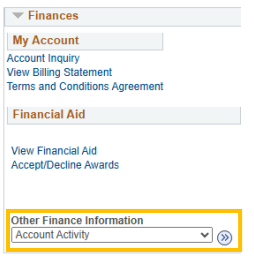
Account Activity: While the Billing Statement shows future activity, Account Activity is the best place to see historical finance information. You will use the drop-down menu to select and access it. Once there, you can edit the date range and filter your charges and payments by term.

You can read more about how to navigate PAWS by reviewing the PAWS Tutorial posted on this page: https://uwm.edu/finances/finances/resources-2/
If you no longer have your original aid offer letter, you can download the “My College Financing Plan” document from your PAWS account. This is a document on UWM letterhead that lists your financial aid and your cost of attendance.
Sometimes, insurance companies ask to verify this information, and the My College Financing Plan is often sufficient for their purposes.
Follow these instructions to download this document from your PAWS account:
- Step 1: In the Finances box on PAWS, click “View Financial Aid”
- Step 2: Select the aid year you wish to view. Note that if you weren’t assigned a financial aid offer in an aid year, you won’t have a college financing Plan in that aid year. Also, the College Financing Plan was not available until the 21/22 aid year.
- Step 3: Under the award summary, select “college financing plan.” This will generate a document similar to the aid offer letter attachment listing information about financial aid and Cost of Attendance.
| My employer is paying UWM directly | My employer is reimbursing me |
| Read about how to submit a Third Party Billing Agreement here: https://uwm.edu/finances/finances/billing-and-payment/ | You can request a tuition reimbursement letter by writing to finances@uwm.edu. Be sure to include all the elements that will be required to be included on the letter. |
You can request a letter confirming this information by writing to finances@uwm.edu.
You can submit forms to finances@uwm.edu. Make sure you have completed any student sections first.
UWM reports students’ enrollment on a monthly basis to a national clearinghouse referenced by federal loan servicers. If you are enrolled at least half-time (4+ credits for graduate students, 6+ credits for undergraduate students), your federal student loans will automatically go into a deferment status.
If your lender or loan servicer requests an in-school deferment form, you should submit this to the Registrars Office if you are an undergraduate student or the Graduate School if you are a graduate student.
Information about how to access enrollment verifications on PAWS and how to order official and unofficial transcripts can be found here: https://uwm.edu/registrar/student-record/transcripts-verifications/