UWM’s Recognize, Respond, Refer: Suicide Prevention Training for Faculty and Staff is now live in Workday Learning!
Search for the training in Workday:
- Hover over Personal in the sidebar and select Learning.
- Click Discover.
- Click the Browse Learning button.
- Search Recognize, Respond, Refer.
If you previously enrolled in the Canvas course and need to confirm your completion, please contact akopitzke@wisc.edu. The Workday course includes updated content, so if you completed RRR in Canvas more than a year ago, we recommend that you refresh your learning by taking the new Workday course. UWM student RRR training remains in Canvas.
FAQs
- Hover over Personal in the sidebar and select Learning.
- Click Discover (fig. 1).
- Click the Browse Learning button (fig. 1).
- Search Recognize, Respond, Refer (fig. 2).
- Click on the course.
- Click Enroll (fig. 3).
- At the Review page, click Submit.
- NOTE: if an Alert appears regarding only enrolling yourself in this course, click Submit again.
- Click Start Course.
- You will be prompted to launch content in a new window. Click Launch Content button (fig. 4).


- Hover over Personal in the sidebar and select Learning.
- Click Discover.
- Click Browse Learning.
- Search Recognize, Respond, Refer.
- Click on the course.
- Click Enroll My Team (fig. 5).
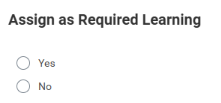
- Click Yes or No for Assigned as Required Learning
- If the training is marked as required, the Learner will be unable to drop the enrollment.
If the learning is required, select a Due Date Type of either Date or Duration. - If you selected Date, add a Due Date. If you selected Duration, add a Duration Unit and Duration for the assignment.
- If the training is marked as required, the Learner will be unable to drop the enrollment.
- Select which employees to enroll by clicking individual employees or by clicking the select box above the column to select all.
- Click Submit.

Yes. While the training content is generally consistent across versions, the Workday version contains important data updates and more accessible training content. If you’ve previously completed RRR in Canvas, we still recommend you complete the updated version in Workday.
Previous Canvas course administrators have access to completion records from Canvas. If you need to confirm completion of the Canvas course, please contact akopitzke@wisc.edu.
No, that record cannot be moved into Workday. The course within Canvas was an old version, so we recommend completion of the newer version in Workday.
- Hover of Personal in the sidebar and select Learning.
- Click My Learning.
- Click View Learning Transcript.
NOTE: The My Transcript page provides a listing of courses Not Started (enrolled in), In Progress, and Complete. Click on course to view more details.
You can complete the training at any time, unless advised otherwise by your supervisor. At this time, this training is not mandatory. Thus, you are not required to retake the training on a regular basis. We recommend student-facing roles complete the training independently every two years.
The training is designed to equip our campus community with the knowledge and skills necessary to recognize and respond to signs of suicidal behavior and refer someone to appropriate supportive resources. By participating, you will be contributing to a safer and more supportive university community for everyone
Three versions of RRR are currently available. These trainings are designed specifically for undergraduate students, graduate and professional students, and faculty and staff. Each university decides independently which versions will be made available at their university. It is incredibly important that anyone at a UW university engages with this training. Opportunities to provide feedback are embedded throughout the training.
Student versions of the training will remain in Canvas. Students can self-enroll through Canvas.